Autopsy Plugin - MalwareIndicator
This is a experimental plugin for indetifying behaviours of malware, based on a generic approach
Plugin version 1.0
malwareindicator (ZIP, 4.02 KB)
SHA256 - 1fe877bc9c8c4c98d9d27fb3ef0ee97c6ddf751016eafa16ff45da6d57681257 (Zip file)
MalwareIndicator v4.2 – Detection Logic Summary
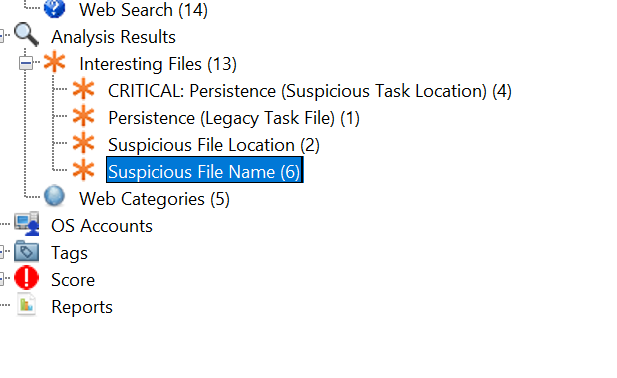
It works as expected, however i have not tested this with multiple malware. There will be false positives detected, as were looking for generics. It made for experimental reasons and also test the limits of Autopsy
Here is a short description
1. File Anomalies & Heuristics
Double Extension Masquerading: Detects executables trying to hide as documents (e.g., invoice.pdf.exe, document.docx.js).
System Binary Masquerading: Identifies critical Windows system files (e.g., svchost.exe, lsass.exe, csrss.exe) running from unexpected locations outside of C:\Windows\System32.
Suspicious Filenames (IOCs): Scans for known hacker tool keywords and malware names (e.g., mimikatz, cobaltstrike, powershell, trickbot).
2. Suspicious File Locations (User Space)
Public Folder: Flags any executable found in C:\Users\Public (High fidelity anomaly).
User Profile Root: Detects executables located directly in the user's root folder (e.g., C:\Users\Name\malware.exe).
Temp & Downloads: Flags executables running from %TEMP% or Downloads directories.
Shallow AppData/ProgramData: Uses "Depth Analysis" to flag executables located directly in the root (or immediate subfolder) of AppData\Roaming or C:\ProgramData, where legitimate software rarely resides.
3. Persistence Mechanisms (Scheduled Tasks)
"Shallow" Task Detection: Flags any file located directly in the root of C:\Windows\System32\Tasks or C:\Windows\Tasks. Legitimate tasks are almost always organized in subdirectories (e.g., Microsoft\Windows...).
Extensionless File Scanning: Specifically targets files in Task folders that lack a file extension (e.g., the services update file used by Trickbot) to bypass standard extension filters.
Legacy Task Files: Detects .job files in C:\Windows\Tasks, which is often used by older malware strains or for evasion.
4. Task Content Analysis
Payload Extraction: Automatically parses the content of flagged Task files (XML/Text) to extract and report the file path of the triggered executable (linking the persistence mechanism to the malware payload).
5. Execution Evidence
Prefetch Correlation: Scans Windows Prefetch (.pf) files to confirm if the suspicious filenames have actually been executed on the system.